




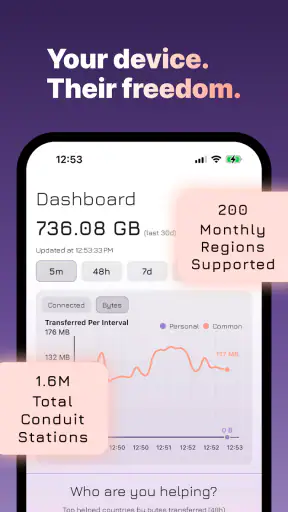



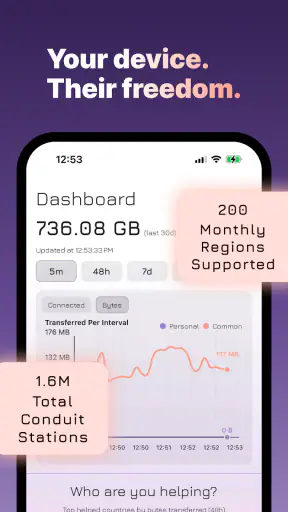

I tried Conduit as a communication app from Psiphon Inc., and my first impression was that it is aimed at a very particular problem: helping people reach the open internet when ordinary access is limited or unreliable. That makes it different from a messaging app, a social network, or a conventional browser. Its role is closer to providing a secure connection path before you use those everyday services.
The short store label is simply “Conduit,” while the longer description presents it as a way to expand access through secure connectivity. In practical terms, I would look at it as a tool you keep available for difficult network situations rather than an app you open for chatting or content discovery. That distinction matters because its usefulness depends heavily on where, when, and why you connect.
How Conduit feels in everyday use
The app is free to install, and its content rating is Everyone, so the initial decision is easy for most people: you can try it without paying an upfront purchase price. The listing also shows in-app purchases ranging from $9.99 to $99.99 per item. I would therefore separate the experience into two questions: whether the free access solves your immediate connection problem, and whether any optional paid value is worthwhile for your particular needs.
I would not treat those purchase amounts as a reason to assume that every user needs to spend money. The sensible approach is to begin with the free side, test it in the exact place and situation where you need it, and only then consider a purchase. That is especially important with connectivity tools, because a service that works well on one network may feel less useful on another. The free entry point is the clearest part of the value proposition; the paid value should be judged by the improvement you can actually notice in your own routine.
On Android, the current release is version 2.3.2 and it requires Android 7.0 or later. That gives the app a fairly broad device range, although anyone using an older phone should check compatibility before planning around it. I also like that the product has a clear job instead of trying to become an all-purpose communication suite. When an app is designed for network access, a focused interface is more useful than a long list of unrelated tools.
A realistic situation where it makes sense
Imagine that I am travelling and the hotel network allows some websites to load but leaves other services unreachable. I do not want to spend an evening changing random phone settings, installing several unfamiliar tools, or repeatedly reconnecting without knowing whether anything has improved. Conduit is the sort of app I would keep ready for that moment: open it, establish the available secure connection, and then try the service I actually need.
That workflow is also useful for someone who depends on online communication for work, study, or family contact and encounters inconsistent access. The important detail is that Conduit is not the destination. It is the connection layer. After using it, I would still rely on my normal browser, email app, messaging service, or other internet application. People expecting a built-in chat system or a replacement for their usual communication apps may misunderstand what they are installing.
A practical habit is to test the connection with a low-stakes task first. I would open a page or service that I already know should be reachable, then check whether the result is stable before starting a video call, uploading a document, or sending something time-sensitive. This avoids blaming the app for a problem caused by the destination service, the local network, or a weak signal. It also gives me a better sense of whether the connection is suitable for ordinary browsing only or for more demanding activities.
What the free option is really worth
For me, the free installation has value because it lowers the risk of experimenting. I can decide whether the app belongs in my travel folder, emergency toolkit, or secondary-device setup without committing money first. That is a stronger proposition than an app that asks for payment before I can find out whether it works in my environment.
Still, “free” does not automatically mean “best choice.” The real benefit is conditional: Conduit is valuable when it gives me access I cannot reliably get through my normal connection. If my home network already provides everything I need, I may rarely open it. In that situation, its free availability is convenient, but it does not create much day-to-day value by itself.
The paid range deserves a cautious reading. Since purchases can reach $99.99 per item, I would not buy anything simply because I wanted a general improvement or because the app seemed useful in theory. I would first identify the problem I am paying to solve, confirm that the free experience points toward a meaningful benefit, and consider how often I expect to use it. A person who needs dependable access regularly may evaluate paid options differently from someone who only wants a backup for occasional travel.
I also would not compare the purchase range directly with the price of a typical messaging app. Those products solve different problems. A messaging app earns its value through contacts, conversations, media sharing, and notifications. Conduit earns its value only when the connection itself is the obstacle. That makes it harder to judge by a simple feature count or by how often it appears on my home screen.
Where it differs from familiar alternatives
The usual alternatives in this category tend to be general-purpose virtual private network tools, browser-based workarounds, or whatever connection method is already built into a phone. Conduit’s appeal is its narrower focus on expanding access through secure connectivity. I find that easier to understand than a crowded utility filled with unrelated settings, but the trade-off is that it may not replace every feature a specialist expects from a broader network product.
If my main goal is choosing among many locations, adjusting advanced connection behavior, or managing a large set of technical preferences, I would compare Conduit carefully with a more configurable alternative before switching. If my goal is simpler—having a focused way to attempt access when the ordinary route fails—the dedicated approach is more attractive. The right choice depends less on brand familiarity and more on whether I need simplicity or extensive control.
Compared with doing nothing, the app gives me another option when a network blocks or disrupts access. Compared with repeatedly changing device settings, it offers a more purposeful workflow. Compared with a full-featured connectivity service, it may appeal to people who want less clutter. Those are meaningful differences, but they do not guarantee that it will be the fastest or most reliable solution in every location.
Small habits that improve the experience
My first tip is to install and open it before the urgent moment arrives. If I wait until I am already unable to reach an important service, I have less patience for learning the interface and less time to troubleshoot. A quick trial on a normal connection lets me understand the basic flow without confusing setup issues with a network emergency.
My second tip is to keep expectations realistic about what a secure connection can solve. It may help with access, but it cannot repair a dead mobile signal, make a distant server respond, or guarantee that every individual website will behave perfectly. When something fails, I would test another ordinary service, reconnect once, and check whether the issue follows the app or the network. That simple comparison prevents unnecessary purchases and avoids wasting time.
My third tip is to treat it as a deliberate tool rather than leaving it active without thinking. When I only need it for one blocked service, I would use it for that task and then return to my normal connection if appropriate. This keeps my routine easier to understand and makes it clearer which connection I am using when handling banking, work, or personal accounts.
A fourth useful habit is to separate access from account security. Conduit’s secure connectivity can be helpful for reaching services, but I would still use strong passwords, device protection, and the security controls provided by each account. I would never assume that a connection tool replaces careful behavior inside email, social, financial, or workplace apps.
Limitations I would consider before installing
The biggest limitation is situational value. If I live and work on networks where everything I need is already available, the app may spend most of its life unused. That is not a failure, but it means the purchase decision should be based on a real access problem rather than curiosity alone.
Another point is that secure connectivity can add an extra step to a routine that is otherwise automatic. Some people will appreciate having a clear tool for difficult networks; others will find any additional connection process inconvenient. I would especially think about this if I need instant access for calls or time-sensitive messages. Testing the app before relying on it is essential.
Performance expectations also need care. A connection path that helps me reach a service may not deliver the same experience as my normal route. Browsing, text communication, and lightweight tasks may feel more forgiving than video, large transfers, or interactive services. I would avoid promising myself that every activity will work equally well until I have tried those activities on the networks that matter to me.
The paid side is another reason to stay deliberate. The presence of purchases up to $99.99 per item means that the app can involve a substantial commitment for some users. I would read the purchase screen closely, understand what I am selecting, and make sure the benefit matches my use case. Someone looking for a completely free, permanent answer to every connectivity problem should not assume that the free installation guarantees that outcome.
Who is most likely to get value
I can recommend trying Conduit to travellers, students, remote workers, and families who sometimes face restricted or unreliable internet access. It is also sensible for people who want a focused backup rather than a collection of complicated tools. Because the app is rated for Everyone, it is approachable for a broad audience, although younger users should still follow the normal guidance of a parent or responsible adult when changing connection settings.
It may also suit someone who supports relatives remotely. Instead of explaining a long series of device changes every time access fails, I could help that person install one clearly defined communication utility and prepare it during a calm moment. The important part is teaching them when to use it and how to return to normal connectivity, not simply placing another icon on the screen.
I would be less enthusiastic for users who want a complete privacy suite, a highly adjustable professional network tool, or a service chosen primarily for entertainment streaming. Conduit may still be worth testing, but those users should compare its focused purpose with alternatives built around their specific requirements. Likewise, if my only concern is sending messages to friends, a normal messaging app remains the more direct choice; Conduit does not replace the conversation layer.
My verdict on trying or skipping it
After looking at the complete picture, I see Conduit as a practical specialist rather than an app everyone needs every day. Its strongest point is the free opportunity to test a focused secure connection tool when ordinary internet access is the problem. The developer is Psiphon Inc., and the app has reached over five million installs with a 4.5 average from around eighteen thousand ratings, which suggests that many people have found the concept useful enough to keep using.
I would install it if I regularly travel, encounter blocked services, or want a prepared fallback for difficult networks. I would begin with the free experience, test it on the exact connection that concerns me, and only consider an in-app purchase after identifying a clear recurring benefit. That is the fairest way to judge value when paid items range from $9.99 to $99.99.
I would skip it if my internet access is already dependable and I have no realistic need for an alternate connection route. I would also look elsewhere if my priority is deep technical customization or a broad package of privacy and network controls. In those cases, another category-specific tool may fit better.
Overall, Conduit makes sense as a backup connection app with a low-risk starting point, not as a universal communication replacement. My recommendation is simple: install it before you need it, test it calmly, keep your expectations tied to the network problem it is meant to address, and treat any paid upgrade as a decision based on repeated personal value rather than the promise of a generic improvement.
For readers using Android 7.0 or newer, the current version is 2.3.2 and the app is available free to start. I would place it in the “useful when needed” category: easy to justify for people who face access barriers, but unnecessary clutter for everyone else. The best reason to choose it is a specific connectivity problem that the free trial can genuinely help solve.


